Tablets, phones, and computers
Run the POS on an iPad, an Android tablet, a laptop, or a desktop. Any modern browser works, and you can install it as a PWA on the till device.
Turn your store into a full point of sale for WooCommerce. Sell at the
counter, scan barcodes, take split payments, and keep selling when
the internet drops. Every sale is a normal WooCommerce order.
WooCommerce core has no point of sale. Woo sells one through its mobile app, but that runs on tablets, takes only WooPayments or Stripe, and stops when your internet does. MultiPOS is the WooCommerce POS plugin that removes those limits. Your staff open a point of sale screen in any browser and ring up sales at the counter. Each sale becomes a real WooCommerce order, so stock, customers, taxes, and reports stay in one place. Start free on one outlet and move up when you grow. MultiPOS is part of the AtubAgency WooCommerce plugin range. MultiPOS 6.2.0 needs WordPress 6.5 or higher, WooCommerce 9.0 or higher, PHP 7.4 or higher. It is tested up to WordPress 7.1 and WooCommerce 11.1.2, and was last updated on September 9, 2026.
Most store owners end up with a cloud POS on the counter and WooCommerce online. Now you have two stock counts, two customer lists, and two sets of numbers that never quite agree.
Someone sells the last item in store, the website still shows it in stock, and a customer orders something you cannot ship. At close, you balance the two by hand.
See how MultiPOS closes itMost point of sale tools add a separate system onto your store and then try to sync it. MultiPOS does the opposite. A WooCommerce point of sale should sell straight from WooCommerce. The sale you ring up in person is the same order, stock count, and customer record you already trust online. Set it up once and your counter and your website share one brain.
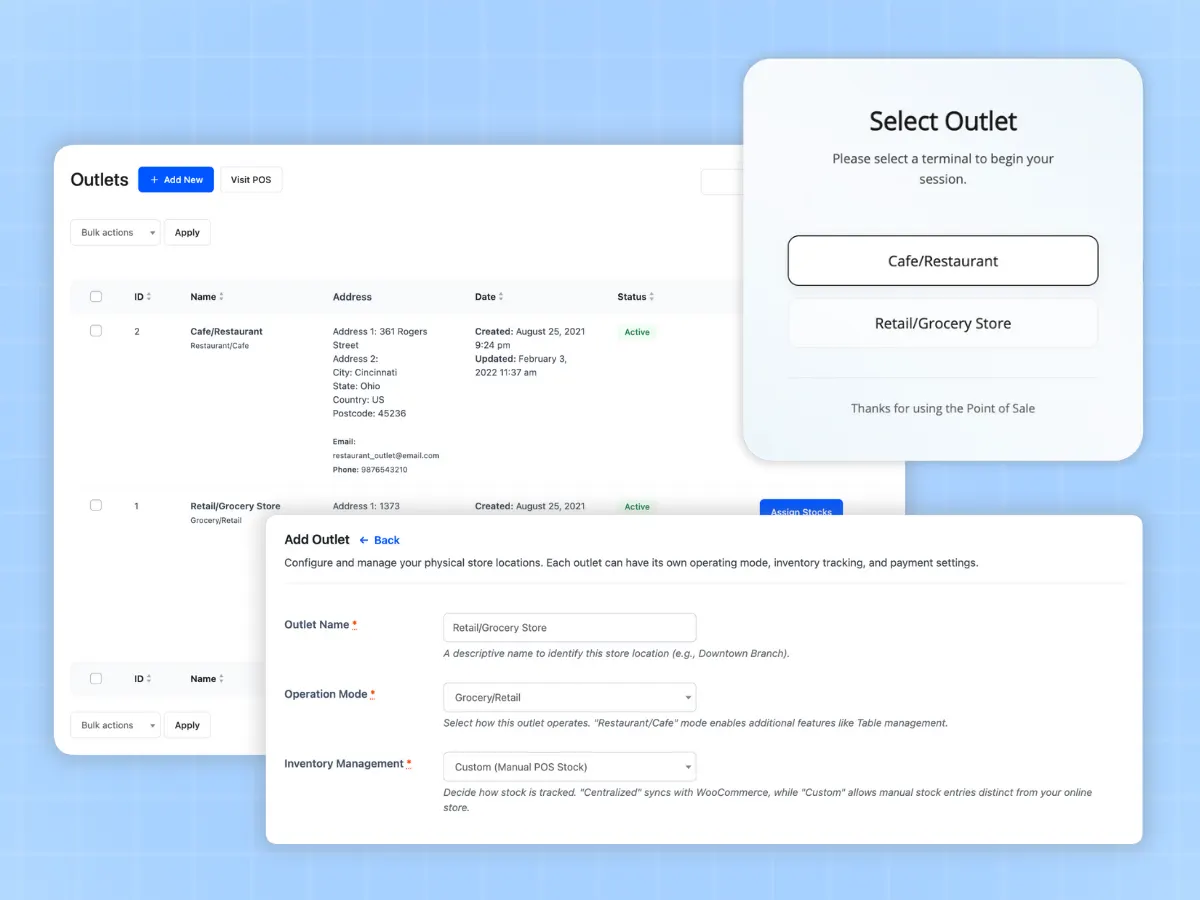
Add one or more outlets and set each one to retail or restaurant mode. That makes it a multi-store POS out of the box. Each outlet can use shared WooCommerce stock or keep its own custom stock, so a shop and a kiosk can run their shelves apart.
Create cashier accounts and assign them to outlets. Admins and cashiers can both open the point of sale. Cashiers only see the outlet and tools they need, so training is quick.
A cashier opens the POS, picks an outlet, and starts selling. Scan a barcode or search by name, apply a discount, take split payment, and print a receipt in seconds.
Every completed sale becomes a WooCommerce order with the right outlet, cashier, tax, and payment record. Stock drops on its own and the customer record updates. Nothing to export.
All you need to handle sales at the counter while staying in sync with WooCommerce.
Grow your business across as many physical outlets as you want. Set up unique stores for different locations, give specific cashiers their roles, and keep track of stock for each place with total freedom.
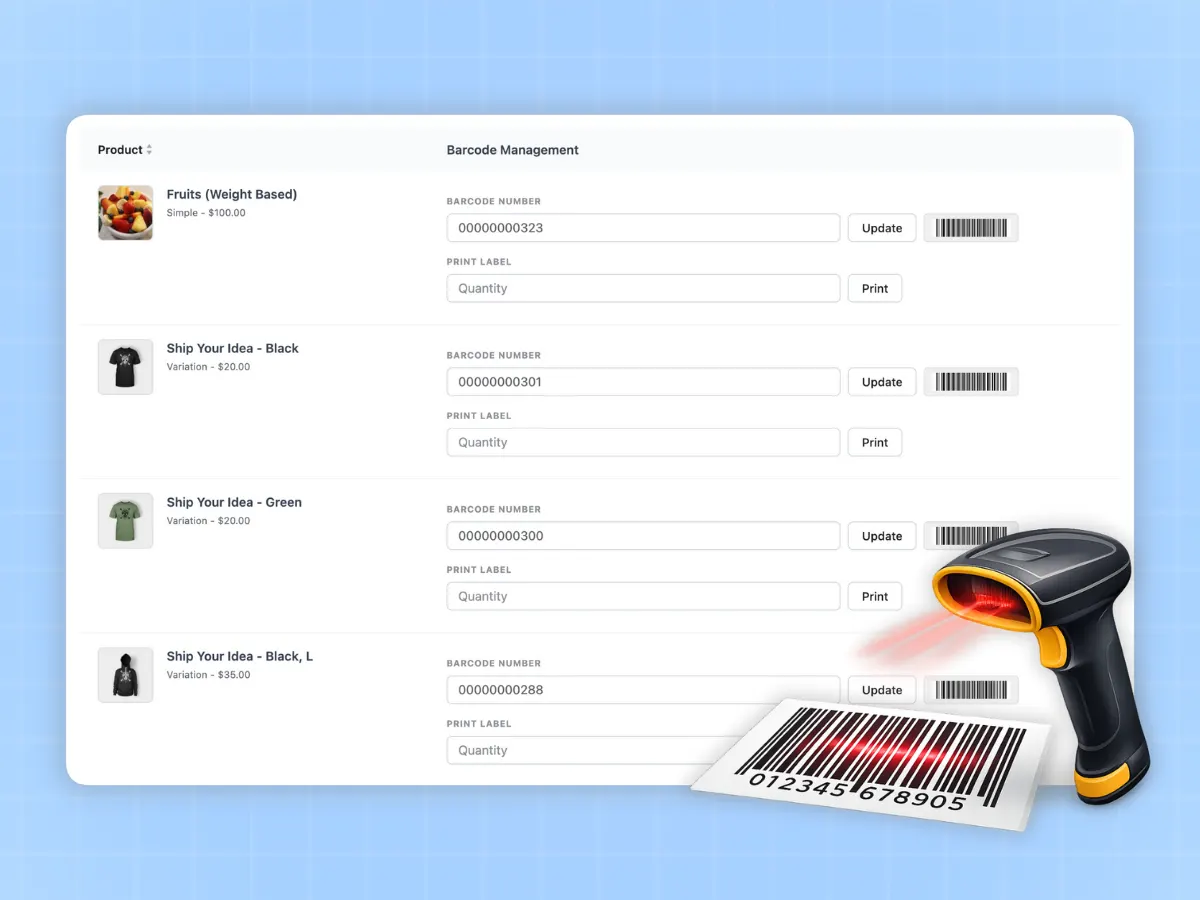
Check out customers faster with automatic barcode creation and scanning. This works well with regular hardware scanners and helps you print barcodes for all your products at once.
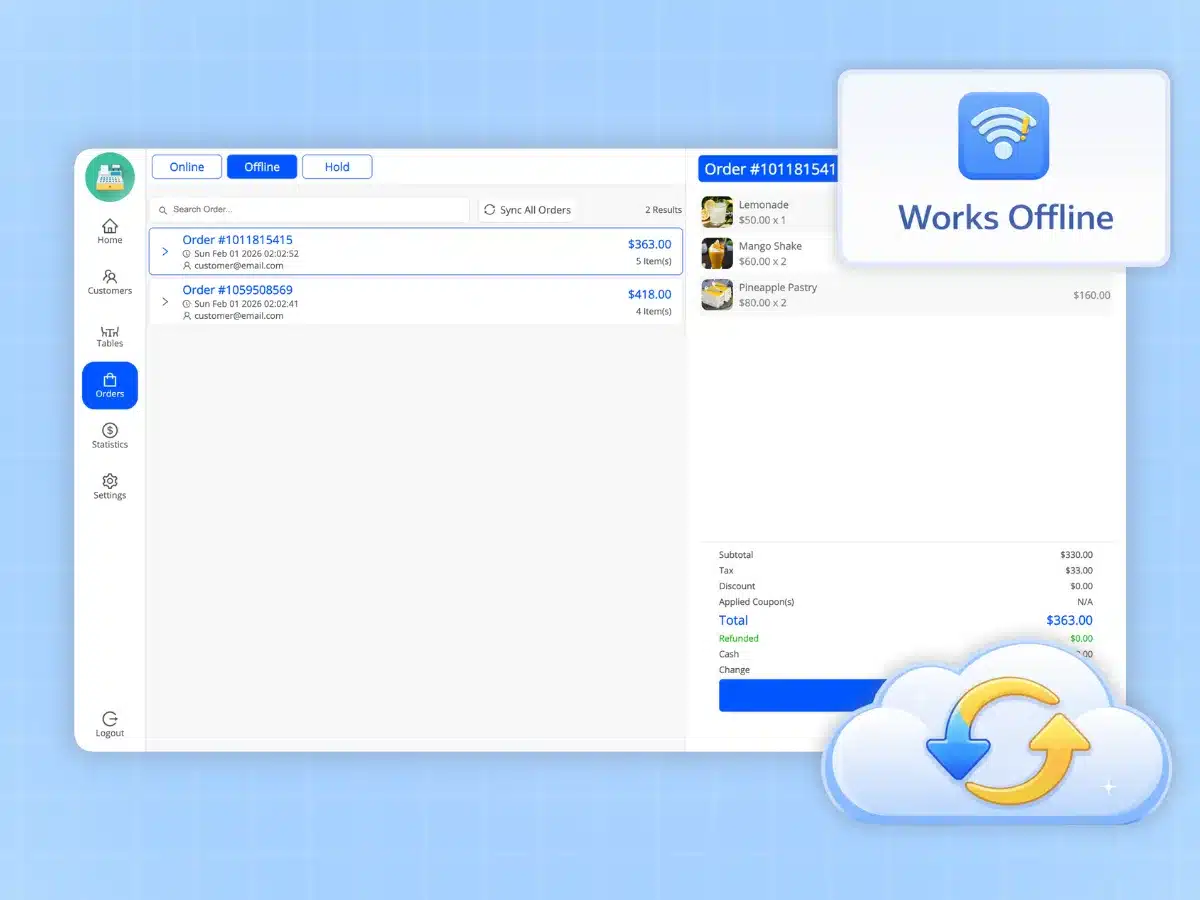
Keep selling even when the internet is down. MultiPOS runs offline, storing data, then updates all orders and stock when you're back online.
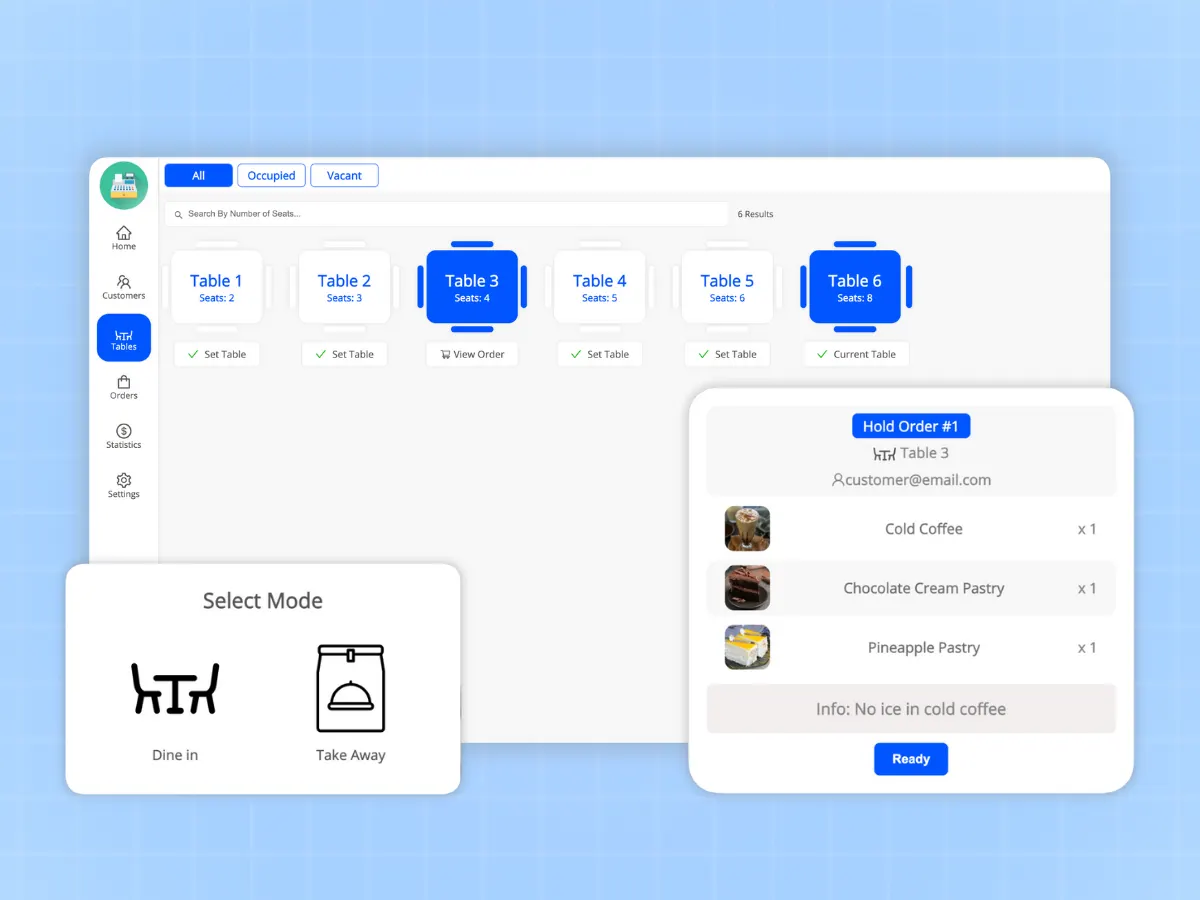
Made just for food businesses. Handle tables, send kitchen orders, and watch order progress from start to finish with a pro kitchen display system.
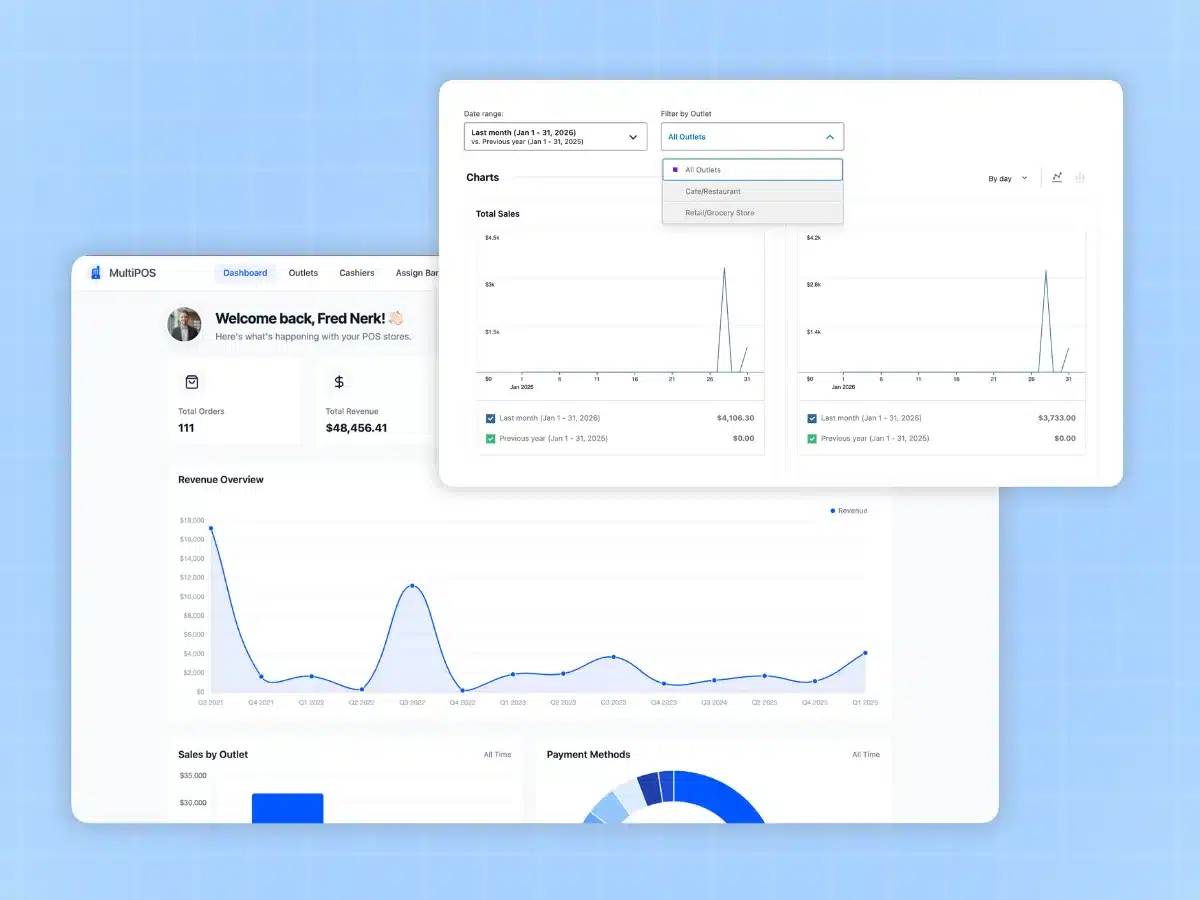
Use detailed sales reports to make smart decisions based on data. Monitor results by outlet or time frame with visual graphs.
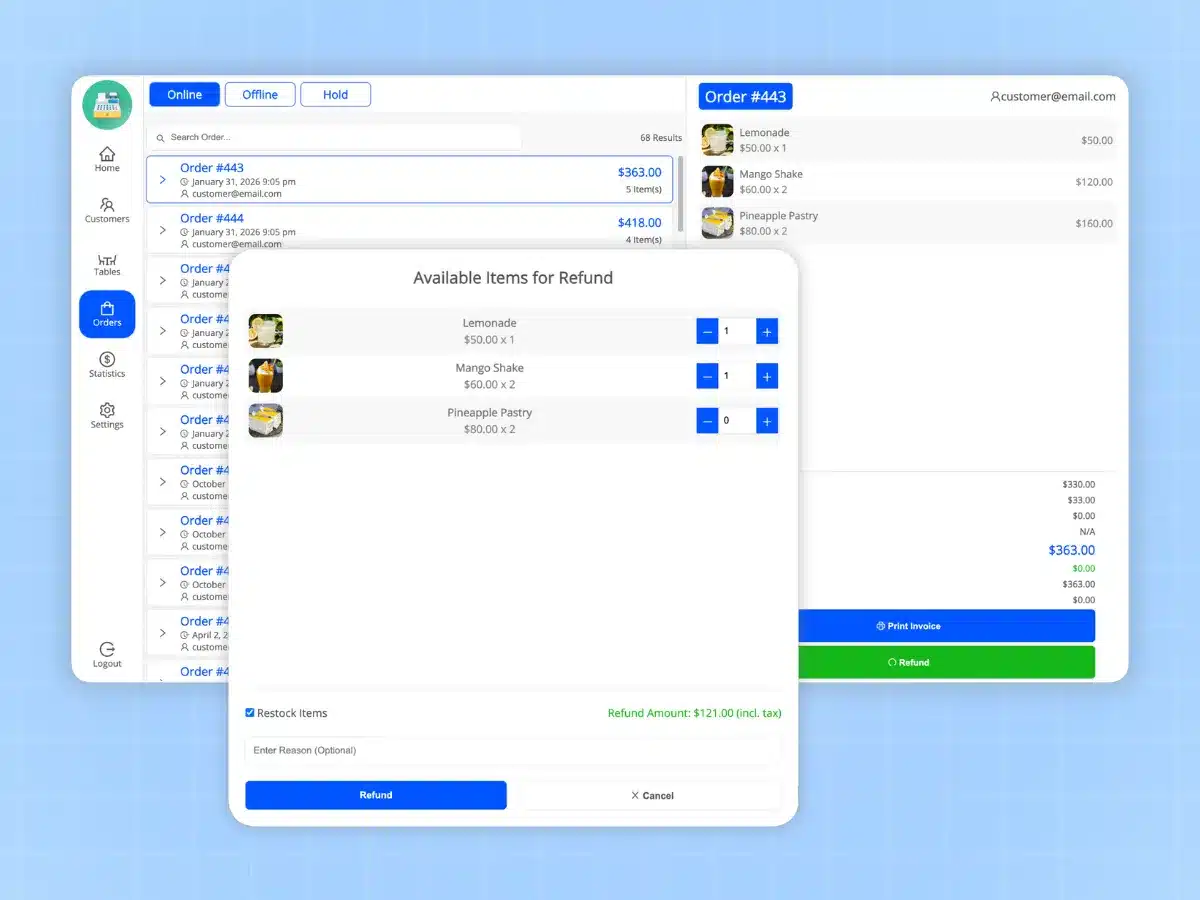
Process returns from the POS system. Handle partial or full refunds while updating inventory and keeping accurate transaction records to maintain transparency.
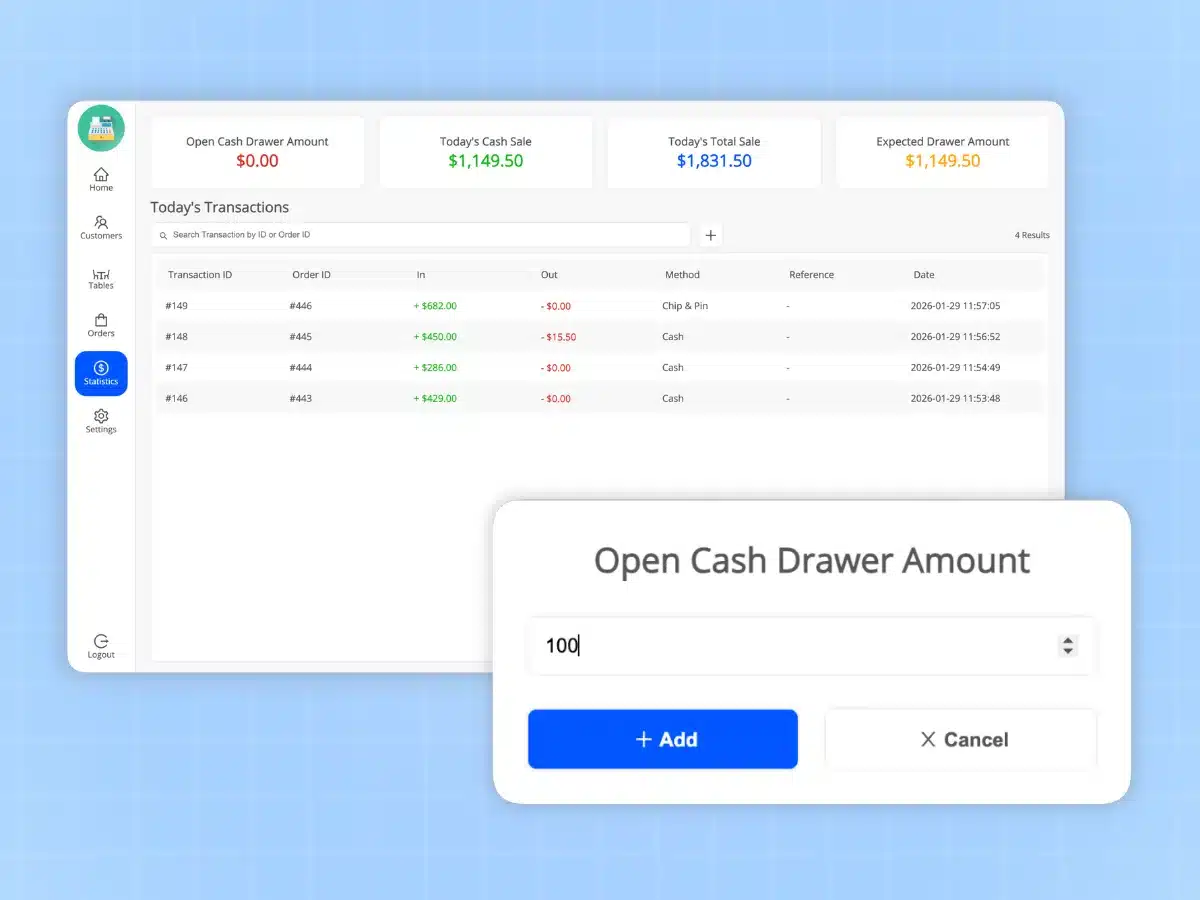
Take full control of your physical cash through petty cash management and keeping track of cash drawers. Log manual transactions and check the difference between expected and real amounts by the end of the day.
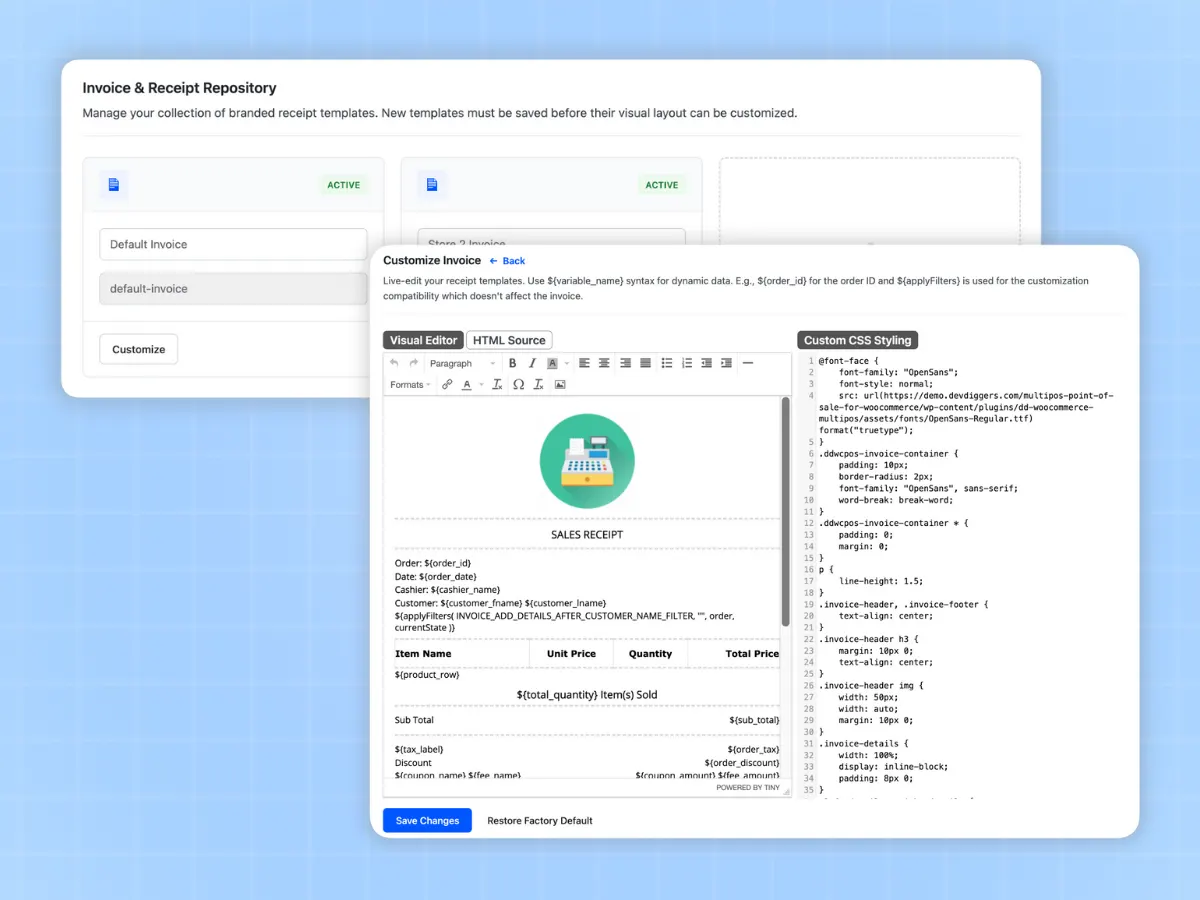
Design receipts that align with your business style. Build personalized invoice templates by adding your logo, headers, and different info fields. Assign specific templates to each store if needed.
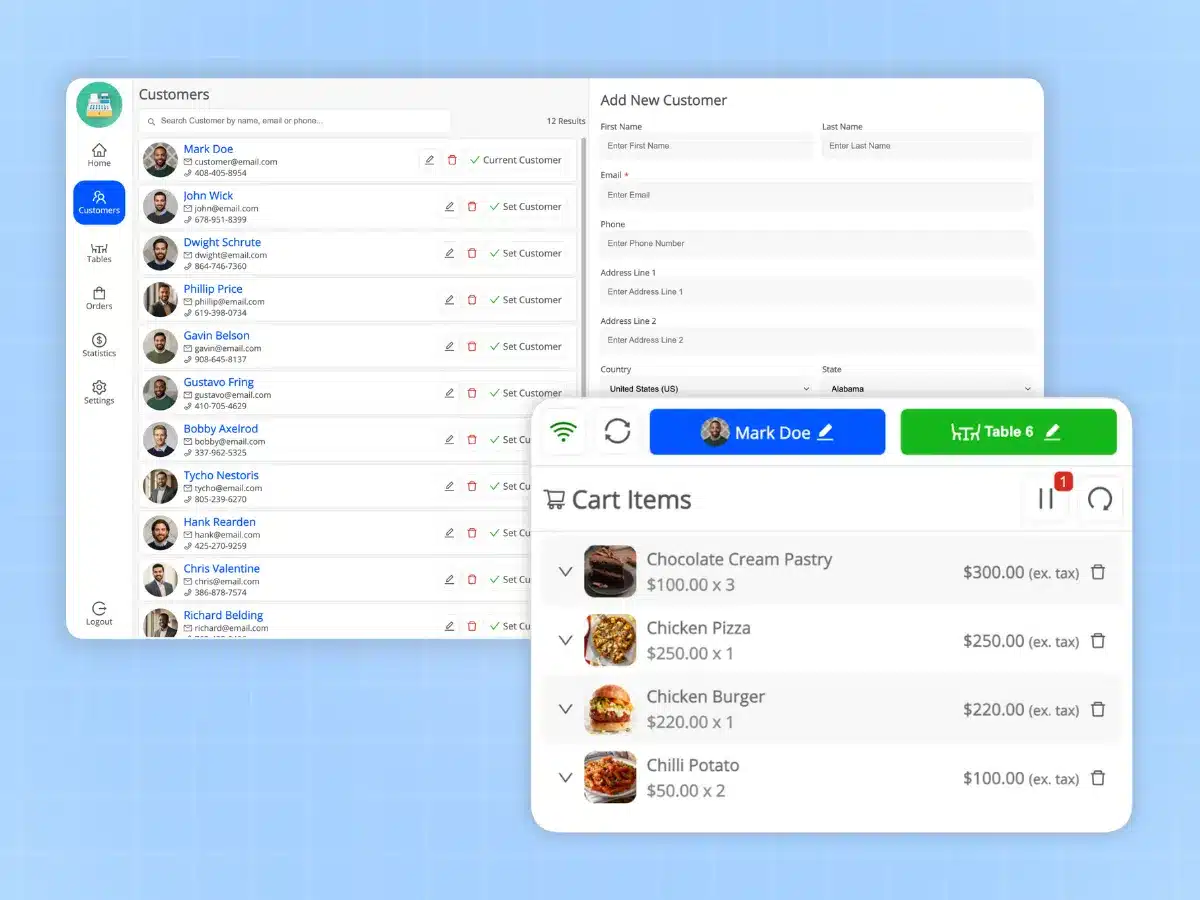
You can access your entire WooCommerce customer database from the POS system to manage customer relationships with existing customers or create new customer accounts. You can also process guest orders for walk-in customers.
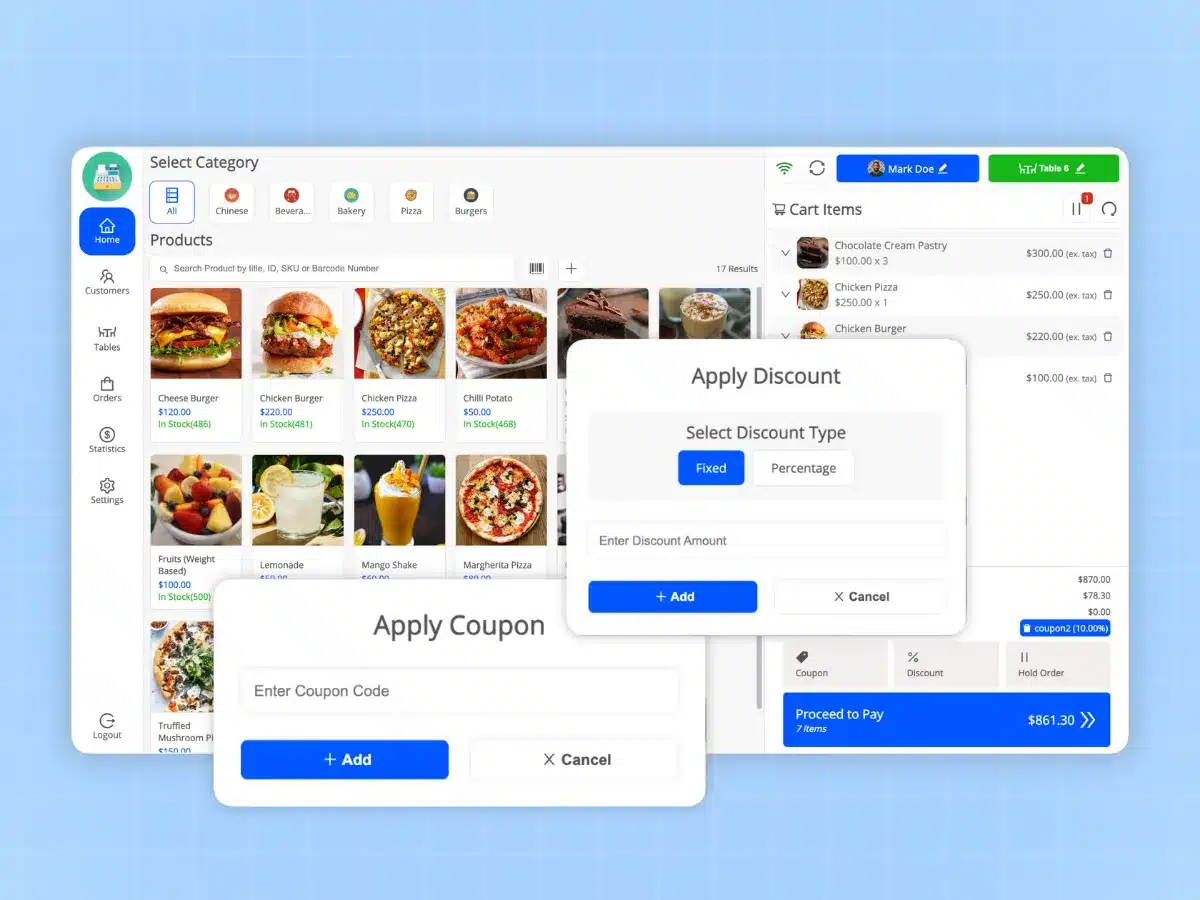
Apply instant discounts at checkout either through the cart-level discount function or by using a WooCommerce coupon code. Both can be either a fixed amount or a percentage-based, with the discount calculated and displayed at checkout in real-time.
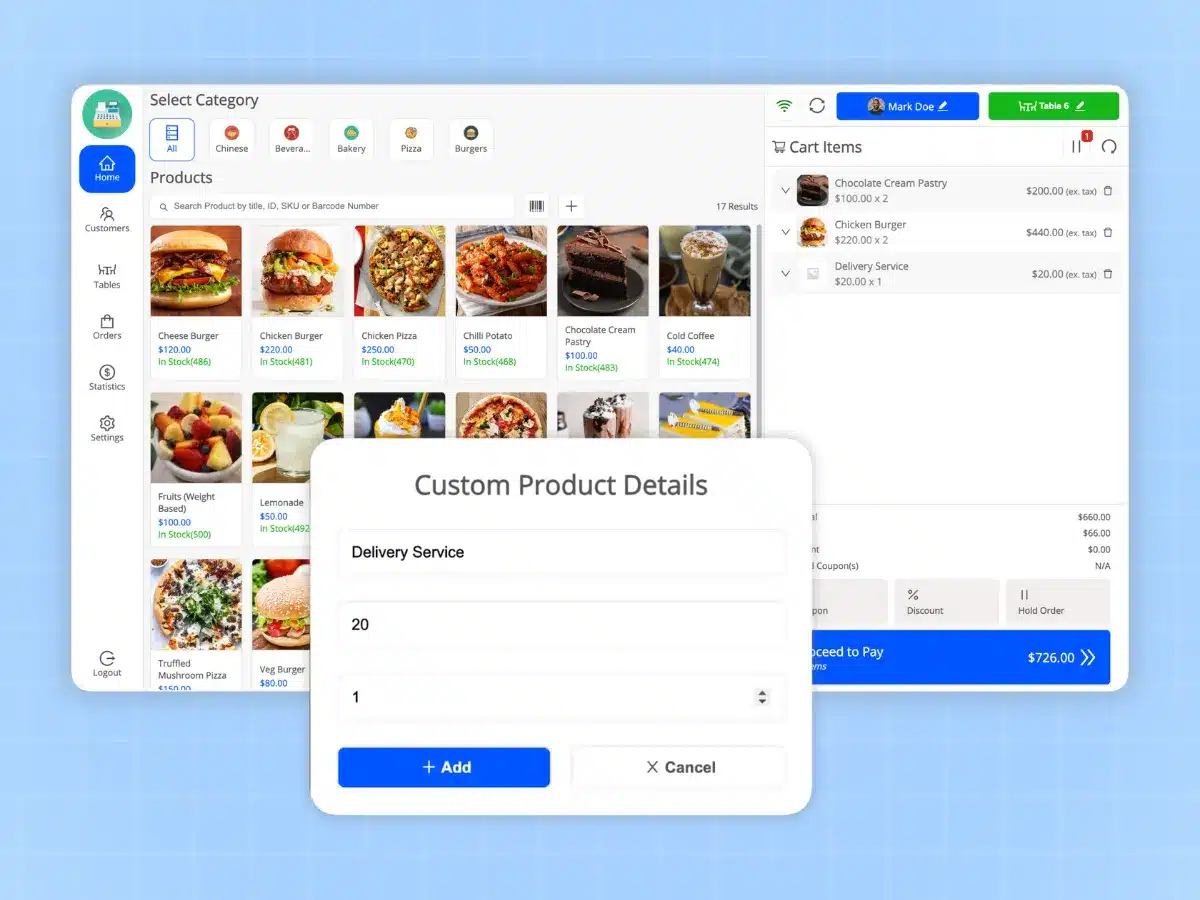
If you sell products that do not appear in your catalog, you can create and price them manually right from the POS terminal. It is useful for services, repairs or as one-offs.
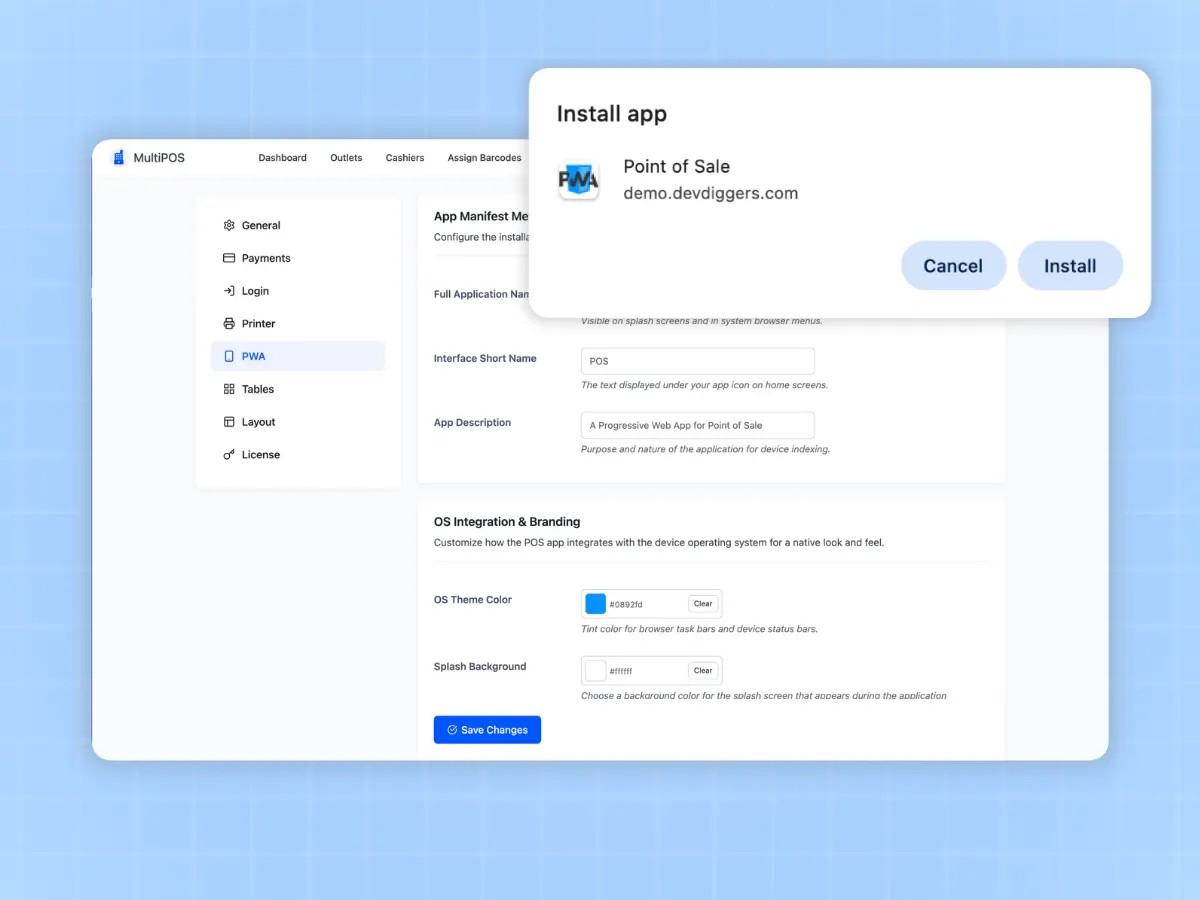
PWA install of MultiPOS gives you native-like application capability on any device for use with standard POS hardware (i.e. thermal printer, barcode scanner, cash drawer).
Here is what most WooCommerce POS pages will not tell you: you do not need new hardware. MultiPOS runs in the browser, so it works with the everyday kit most counters already own. There is no proprietary terminal to rent and nothing to lock you in. If your device has a browser, it can run the point of sale.
Run the POS on an iPad, an Android tablet, a laptop, or a desktop. Any modern browser works, and you can install it as a PWA on the till device.
Most USB and Bluetooth barcode scanners work like a keyboard, so they scan straight into the POS with a beep on each add.
Print sales receipts and your own designed invoices to the receipt printer connected to your device through the browser print dialog.
Print barcode label sheets in the size, margins, and layout your label printer expects, so shelf tags stay tidy and scannable.
Take the card on the reader or terminal you already use, then log cash, card, or split payments against the WooCommerce order. There is nothing new to buy or rent.
MultiPOS sells straight from WooCommerce, so it respects the rules you already set. Your taxes, coupons, and product types keep working the same way at the counter as they do online.
We looked at what store owners actually complain about with other point of sale plugins. Here is where MultiPOS is different.
The point of sale in the WooCommerce mobile app runs on tablets, takes only WooPayments or Stripe, and needs an internet connection. MultiPOS runs in any browser, takes any payment method you set up, and keeps selling offline.
Several popular WooCommerce POS plugins stop the moment the internet does. MultiPOS keeps selling from local storage and pushes orders when you are back online.
A setup wizard walks you through the POS address, your first outlet, stock, and cashiers on first activation. Other point of sale plugins hang you on a long manual before you can ring up a single sale.
No cloud middleman, and no export or import step. Your sales, stock, and customers stay in the WooCommerce database you already own, host, and back up.
A cloud POS goes down when its servers do, and you cannot sell. MultiPOS runs on your own site and keeps working offline, so your counter does not depend on someone else staying online.
Plenty of POS plugins sell their kitchen screen as a separate paid add-on. MultiPOS includes tables, dine-in, take away, and the kitchen display in the same license, so a cafe pays once.
A product with many sizes and colors clutters some point of sale screens until they are unusable. MultiPOS shows each variation as its own tidy item, so busy catalogs stay fast to ring up.
You pay once a year, not a slice of every transaction. There are no outlet limits on any plan, so opening a second or fifth location does not raise your software bill.
MultiPOS is made by a team that builds WooCommerce plugins full time, follows WordPress coding standards, and answers support in hours. You are buying from people who know the platform, not a side project.
Set your logo, colors, and fonts on the point of sale, brand the cashier login screen, and print receipts and invoices in your own style. The counter looks like your store, not like generic till software.
More than 20 accepted contributions to WooCommerce core. The standards we hold the platform to go into MultiPOS too.
More than $125,000 in sales and 500+ five-star reviews across Trustpilot, Google, and Envato.
No cloud middleman and no export step. Every counter sale is a WooCommerce order in the database you already host and back up.
Real WooCommerce developers answer your tickets. Every plan includes priority support and a 14-day refund.
A real free build runs on WordPress.org with no time limit. Move up only when you open a second outlet or need to sell offline.
Translation ready with a bundled language file and full right-to-left support, so your counter reads correctly for stores in 158+ countries.
Add MultiPOS to your WordPress site and activate it from the Plugins menu. You configure it from the MultiPOS screen under AtubAgency Plugins, so there is nothing scattered across your admin.
Add each shop or location and set it to retail or restaurant mode. Choose shared WooCommerce stock or custom stock per outlet, and set the order status you want POS orders to use.
Create cashier accounts, assign them to outlets, and set the payment methods each outlet accepts. Add tables too if the outlet is a cafe or restaurant.
A cashier opens the POS endpoint, signs in, and picks an outlet. Scan or search a product, take payment, and print the receipt. Install it as a PWA on the till for one-tap access.
Real reviews from verified buyers of our WooCommerce POS plugin.
This POS system exceeded my expectations!
This plugin is outstanding. The code quality is excellent and it covers a wide range of POS features. The support team responds quickly and the documentation is thorough. I highly recommend it to any store owner looking for a reliable POS solution.
 James WilsonStore Manager
Multi-store management finally makes sense
I run three outlets and MultiPOS makes managing them simple. Each store has its own settings and the centralized dashboard keeps everything organized. The multi-store POS capabilities are exactly what we needed to scale.
 Maria RodriguezRetail Director
Barcode scanning is instant and accurate
Barcode scanning works flawlessly with our USB scanner. Printing labels is quick and the automatic SKU assignment saves hours of manual work. Every product scans cleanly on the first try.
 David ChenInventory Lead
Great customer support
Great support, I recommend it 100%.
 Sophia MillerVerifiedVerified Buyer
Exceptional customer support!
The customer support is exceptionally intelligent.
 Daniel WrightVerifiedVerified Buyer
High Quality WooCommerce POS Plugin
The support from DevDiggers is extremely fast and very high quality. They completed several custom developments for us, which greatly improved the efficiency of our business compared to our previous plugin setup. The team...
 Chris AndersonVerifiedVerified Buyer
This plugin is outstanding
This plugin is outstanding, offering a wide range of capabilities and excellent code quality! The support team promptly resolved an issue I faced when I submitted a support request. I highly recommend it.
 Thomas ReedVerifiedVerified Buyer
Offline mode saved our busiest day
When our internet went down during a busy Saturday, MultiPOS kept running. All transactions saved locally and synced instantly once the connection returned. The offline POS feature is a true lifesaver.
 Sarah MitchellCafé Owner
Restaurant mode is a game changer
The restaurant mode transformed our café. Table management is intuitive and sending orders to the kitchen display works seamlessly with our workflow. Dine-in and take-away orders are handled perfectly.
 Ahmed HassanRestaurant Manager
Custom receipts look professional
Customizing receipts with our logo and layout was easy. The 80mm, 58mm, and letter formats work perfectly with our thermal printers. Our branded invoices look professional at every checkout.
 Emily BrooksOperations Manager
PWA install feels like a native app
Installing as a PWA on our iPad gave us a native-like experience. It feels just like an app and loads instantly every time. Touchscreen tablets work beautifully with MultiPOS.
 Rachel AdamsMobile Retailer
Refund tracking is fully transparent
Processing refunds is straightforward. The inventory updates automatically and the audit logs keep everything transparent for our accounting team. Partial and full refunds are both handled smoothly.
 Tom BrooksFinance Controller
Quick and Reliable Support
The customer support is really good and very fast. They respond quickly and help solve issues without any delay. Overall, a smooth and helpful experience.
 Kevin PatelRetail Director
Discounts and coupons work flawlessly
Applying discounts and coupons at checkout is fast. The real-time calculation helps customers see exactly how much they're saving. Both fixed and percentage discounts work exactly as expected.
 Lisa ChangStore Owner
Sales reports guide our decisions
The sales reports are detailed and easy to read. Comparing performance between outlets helps us make better business decisions quickly. The real-time dashboard keeps us always informed.
 Elena VasquezAnalytics Manager
Built by real WooCommerce specialists
As a developer, I appreciate the clean REST routes, filter hooks, and full HPOS support. MultiPOS integrates cleanly with LoyaltyX and the WCFM build. The code follows WordPress standards properly.
 Carlos RiveraDeveloper
This POS system exceeded my expectations!
This plugin is outstanding. The code quality is excellent and it covers a wide range of POS features. The support team responds quickly and the documentation is thorough. I highly recommend it to any store owner looking for a reliable POS solution.
James WilsonStore ManagerMulti-store management finally makes sense
I run three outlets and MultiPOS makes managing them simple. Each store has its own settings and the centralized dashboard keeps everything organized. The multi-store POS capabilities are exactly what we needed to scale.
Maria RodriguezRetail DirectorBarcode scanning is instant and accurate
Barcode scanning works flawlessly with our USB scanner. Printing labels is quick and the automatic SKU assignment saves hours of manual work. Every product scans cleanly on the first try.
David ChenInventory LeadGreat customer support
Great support, I recommend it 100%.
Sophia MillerVerifiedVerified BuyerExceptional customer support!
The customer support is exceptionally intelligent.
Daniel WrightVerifiedVerified BuyerHigh Quality WooCommerce POS Plugin
The support from DevDiggers is extremely fast and very high quality. They completed several custom developments for us, which greatly improved the efficiency of our business compared to our previous plugin setup. The team...
Chris AndersonVerifiedVerified BuyerThis plugin is outstanding
This plugin is outstanding, offering a wide range of capabilities and excellent code quality! The support team promptly resolved an issue I faced when I submitted a support request. I highly recommend it.
Thomas ReedVerifiedVerified BuyerOffline mode saved our busiest day
When our internet went down during a busy Saturday, MultiPOS kept running. All transactions saved locally and synced instantly once the connection returned. The offline POS feature is a true lifesaver.
Sarah MitchellCafé OwnerRestaurant mode is a game changer
The restaurant mode transformed our café. Table management is intuitive and sending orders to the kitchen display works seamlessly with our workflow. Dine-in and take-away orders are handled perfectly.
Ahmed HassanRestaurant ManagerCustom receipts look professional
Customizing receipts with our logo and layout was easy. The 80mm, 58mm, and letter formats work perfectly with our thermal printers. Our branded invoices look professional at every checkout.
Emily BrooksOperations ManagerPWA install feels like a native app
Installing as a PWA on our iPad gave us a native-like experience. It feels just like an app and loads instantly every time. Touchscreen tablets work beautifully with MultiPOS.
Rachel AdamsMobile RetailerRefund tracking is fully transparent
Processing refunds is straightforward. The inventory updates automatically and the audit logs keep everything transparent for our accounting team. Partial and full refunds are both handled smoothly.
Tom BrooksFinance ControllerQuick and Reliable Support
The customer support is really good and very fast. They respond quickly and help solve issues without any delay. Overall, a smooth and helpful experience.
Kevin PatelRetail DirectorDiscounts and coupons work flawlessly
Applying discounts and coupons at checkout is fast. The real-time calculation helps customers see exactly how much they're saving. Both fixed and percentage discounts work exactly as expected.
Lisa ChangStore OwnerSales reports guide our decisions
The sales reports are detailed and easy to read. Comparing performance between outlets helps us make better business decisions quickly. The real-time dashboard keeps us always informed.
Elena VasquezAnalytics ManagerBuilt by real WooCommerce specialists
As a developer, I appreciate the clean REST routes, filter hooks, and full HPOS support. MultiPOS integrates cleanly with LoyaltyX and the WCFM build. The code follows WordPress standards properly.
Carlos RiveraDeveloperRestaurant mode is a game changer
The restaurant mode transformed our café. Table management is intuitive and sending orders to the kitchen display works seamlessly with our workflow. Dine-in and take-away orders are handled perfectly.
Ahmed HassanRestaurant ManagerCustom receipts look professional
Customizing receipts with our logo and layout was easy. The 80mm, 58mm, and letter formats work perfectly with our thermal printers. Our branded invoices look professional at every checkout.
Emily BrooksOperations ManagerPWA install feels like a native app
Installing as a PWA on our iPad gave us a native-like experience. It feels just like an app and loads instantly every time. Touchscreen tablets work beautifully with MultiPOS.
Rachel AdamsMobile RetailerRefund tracking is fully transparent
Processing refunds is straightforward. The inventory updates automatically and the audit logs keep everything transparent for our accounting team. Partial and full refunds are both handled smoothly.
Tom BrooksFinance ControllerQuick and Reliable Support
The customer support is really good and very fast. They respond quickly and help solve issues without any delay. Overall, a smooth and helpful experience.
Kevin PatelRetail DirectorDiscounts and coupons work flawlessly
Applying discounts and coupons at checkout is fast. The real-time calculation helps customers see exactly how much they're saving. Both fixed and percentage discounts work exactly as expected.
Lisa ChangStore OwnerSales reports guide our decisions
The sales reports are detailed and easy to read. Comparing performance between outlets helps us make better business decisions quickly. The real-time dashboard keeps us always informed.
Elena VasquezAnalytics ManagerBuilt by real WooCommerce specialists
As a developer, I appreciate the clean REST routes, filter hooks, and full HPOS support. MultiPOS integrates cleanly with LoyaltyX and the WCFM build. The code follows WordPress standards properly.
Carlos RiveraDeveloperRestaurant mode is a game changer
The restaurant mode transformed our café. Table management is intuitive and sending orders to the kitchen display works seamlessly with our workflow. Dine-in and take-away orders are handled perfectly.
Ahmed HassanRestaurant ManagerCustom receipts look professional
Customizing receipts with our logo and layout was easy. The 80mm, 58mm, and letter formats work perfectly with our thermal printers. Our branded invoices look professional at every checkout.
Emily BrooksOperations ManagerPWA install feels like a native app
Installing as a PWA on our iPad gave us a native-like experience. It feels just like an app and loads instantly every time. Touchscreen tablets work beautifully with MultiPOS.
Rachel AdamsMobile RetailerRefund tracking is fully transparent
Processing refunds is straightforward. The inventory updates automatically and the audit logs keep everything transparent for our accounting team. Partial and full refunds are both handled smoothly.
Tom BrooksFinance ControllerQuick and Reliable Support
The customer support is really good and very fast. They respond quickly and help solve issues without any delay. Overall, a smooth and helpful experience.
Kevin PatelRetail DirectorDiscounts and coupons work flawlessly
Applying discounts and coupons at checkout is fast. The real-time calculation helps customers see exactly how much they're saving. Both fixed and percentage discounts work exactly as expected.
Lisa ChangStore OwnerSales reports guide our decisions
The sales reports are detailed and easy to read. Comparing performance between outlets helps us make better business decisions quickly. The real-time dashboard keeps us always informed.
Elena VasquezAnalytics ManagerBuilt by real WooCommerce specialists
As a developer, I appreciate the clean REST routes, filter hooks, and full HPOS support. MultiPOS integrates cleanly with LoyaltyX and the WCFM build. The code follows WordPress standards properly.
Carlos RiveraDeveloperSave 30% on your first year with code POS30, applied for you at checkout. It ends when the timer at the top of this page runs out. No per-sale fees after that, and no outlet limits on any plan.
Prices shown include the 30% POS30 discount, which applies to your first year. After that it renews at the regular price each year until you cancel, and you can cancel anytime from your account. Every plan is backed by our 14-day refund policy. Not ready to buy? Contact our support team.
$97/year
Just $8.08/mo, billed annually
$419/year
Just $34.92/mo, billed annually
$559/year
Just $46.58/mo, billed annually
If MultiPOS does not work as promised on your setup, you have the backup of our14-day refund policy to ask for your money back.
Every screen below comes from the plugin running a real WooCommerce store. The live demo is the same build and needs no account.
The questions store owners ask us most about running a WooCommerce POS, answered straight.
Ask a QuestionWooCommerce core does not include a point of sale. Woo sells a separate POS through its mobile app. That one runs on tablets, accepts only WooPayments or Stripe, sells in about ten countries, and needs an internet connection. It has no second outlet, no restaurant tables, and no kitchen screen. MultiPOS covers all of that in any browser, and it keeps selling offline.
Yes! MultiPOS has a robust offline mode. You can process sales, manage inventory, and handle all POS operations without internet. All data syncs automatically when you reconnect.
Our Professional and Enterprise plans support unlimited stores/outlets. You can run as many physical locations as you need from a single WooCommerce installation.
Absolutely. MultiPOS syncs inventory in real-time. When a product sells in-store, your online stock updates instantly. No overselling, no manual stock counts needed.
MultiPOS works with standard POS hardware you likely already have: thermal receipt printers, USB/Bluetooth barcode scanners, cash drawers, touch screens, and payment terminals. No special equipment required.
Yes! All plans come with a 14-day free trial. No credit card required to start. If you're not satisfied within 14 days, we offer a full refund—no questions asked.
We offer direct support from our development team. You can reach us via email, and we also provide comprehensive documentation, video tutorials, and live demo access for testing before purchase.
Yes, MultiPOS includes a visual invoice editor. Add your logo, headers, footers, and custom fields. You can even set different templates for each store location.
MultiPOS connects directly to your WooCommerce store. All your existing products, variations, categories, and pricing sync automatically. You can also create custom products on the fly at the POS.
Add a WooCommerce POS plugin that keeps every sale inside your store. The live demo is a fully working till. No account, no credit card. Try it, then pick a plan and be selling at the counter today.
What you get the day you switch your counter over.
Store owners in 158+ countries run on AtubAgency.
Elite Author with $125,000+ in sales.
